User Guide
Solar Forecast shows a solar radiation forecast (Global Horizontal Irradiation, or GHI), sunshine duration, UV index, and temperature, powered by Open-Meteo.
Data refresh
Open-Meteo blends several national weather models, and each one updates on its own schedule, for example ECMWF every 6 hours and NOAA GFS roughly hourly. Which model applies to your location, and therefore how often the underlying forecast actually changes, depends on where you are.
Every time this page loads, it fetches the latest data directly from Open-Meteo (never a cached snapshot), and then re-fetches automatically on the interval you set with the Refresh control. Refreshing more often than the underlying model updates won't reveal new data, it just checks again for whenever Open-Meteo's next update lands.
Grid accuracy
Weather models don't forecast individual addresses; they forecast a grid of points, with spacing that depends on the model (roughly 9-25 km for global models like ECMWF, down to a few km for higher-resolution regional ones). Open-Meteo snaps whatever coordinates you request to the nearest grid point of the model it selects, so the forecast you see represents that whole grid cell, not your exact spot.
The footer's Grid row shows the coordinates Open-Meteo actually used, which can differ slightly from what you entered. Click it to see exactly how far off it is on the map.
Customization
Location
By default the forecast is for Dublin. To change it, use the controls in the top navigation bar:
- Lat,Lon field: type coordinates as
latitude,longitudeand press Enter. Clearing the field and pressing Enter resets to Dublin. - Location button (the crosshair icon): asks your browser for your current location and switches the forecast to it.
- Clicking the Lat,Lon label opens the current coordinates in Google Maps.
You can also set the location directly in the URL, for example
?lat=51.5074&lon=-0.1278.
Scale (units)
At the bottom of the page, the Scale row lets you switch how the GHI values are displayed:
- kWh/m² (the default) shows plain energy output.
- MJ/m² shows the raw value as reported by Open-Meteo.
- The input field next to it accepts a custom multiplier, for example to
roughly match your observed daily generation capacity (
?scale=5).
Forecast window and refresh
Also in the footer:
- Forecast Days: how many days of daily data to show (7 or 14, or a custom number).
- Forecast Hours: how many hours of hourly data to show, counted from yesterday (72 or 96, or a custom number).
- Refresh: how often the page automatically re-fetches data, in minutes (10, 30, 60, or a custom number).
Each of these can also be set directly in the URL, for example
?forecast_days=7&forecast_hours=96&refresh=10.
Chart y-axis scaling
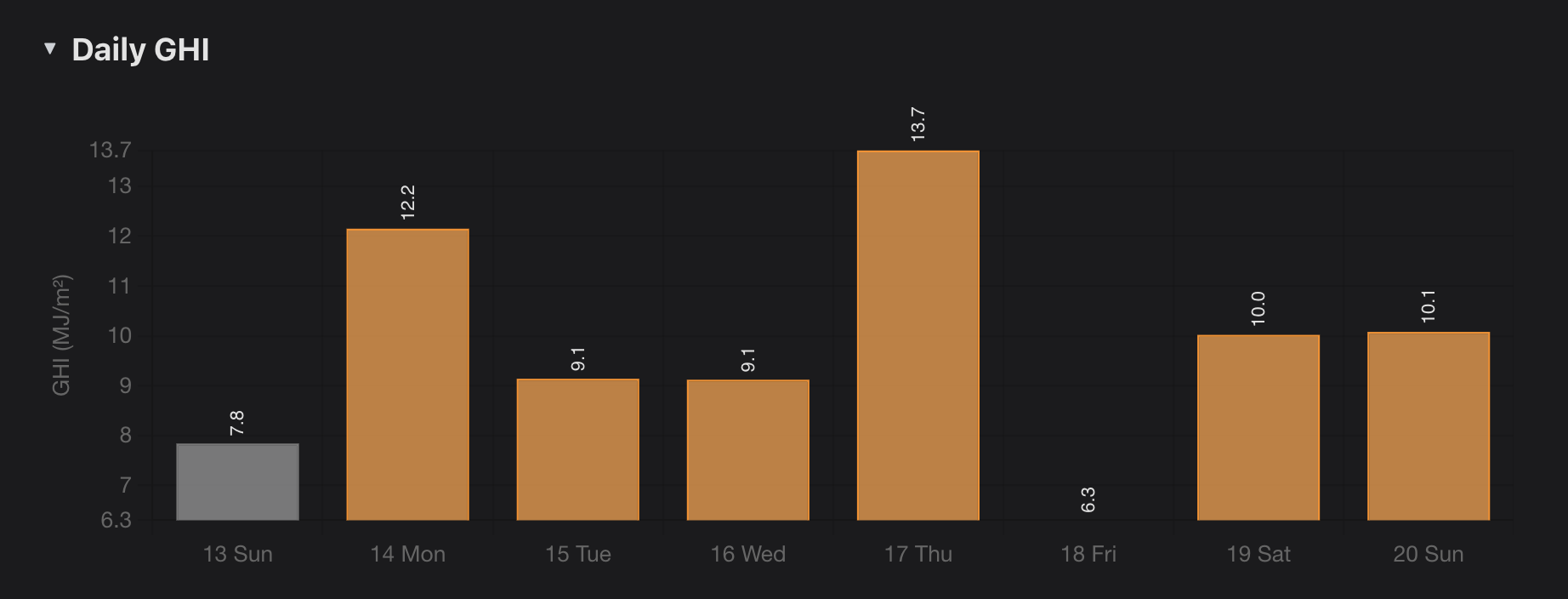
The y-axis on every chart is scaled to the range of the values shown, not from zero. This makes differences between bars easier to see and lets you read the value range straight off the y-axis, but it also means the bar with the lowest value can look almost empty, since it barely rises above the axis minimum:
Adding to your home screen
On iPhone, open the site in Safari, tap the share icon, then Add to Home Screen to get an app-like icon and launch experience.
Android has a similar option: open the site in Chrome, tap the three-dot menu, then choose Add to Home screen.